
Free spreadsheet template
Google Sheets expense tracker template
Keep every expense beside its receipt. Start with a blank tracker, record what you spent, and link each row to the original file in Google Drive.
Download the free templateExcel workbook (.xlsx) · Opens in Google Sheets · No Gexpense signup
What’s included
- A blank Expenses tab with 1,000 entry rows.
- Date, merchant, description, category, amount, receipt link and notes columns.
- A total that updates when you enter amounts, plus filterable column headers.
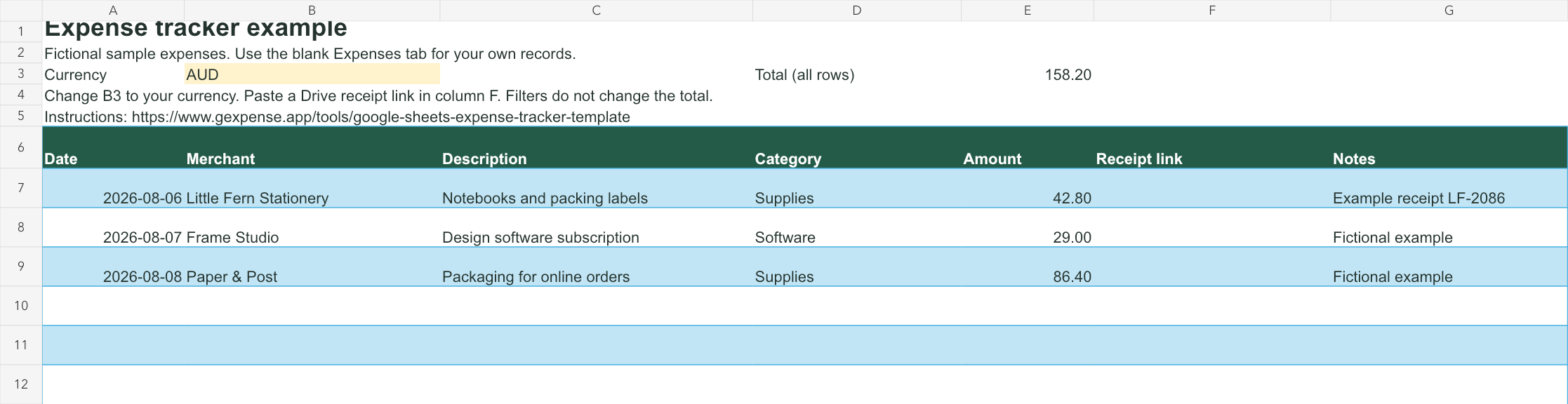
- A separate Example tab with three fictional expenses showing how the tracker works.
Open it in Google Sheets
- Download the workbook above.
- In Google Sheets, open a blank spreadsheet and choose File → Import → Upload.
- Select the workbook, choose Create new spreadsheet, then import it.
- Open the Expenses tab, set your currency in B3, and add your first expense in row 7.
Give each receipt one row
For example, the sample Little Fern Stationery receipt becomes an expense dated 6 August 2026, with “Notebooks and packing labels” as the description, “Supplies” as the category, and 42.80 as the amount. Upload your own receipt to Drive and paste its link into the same row.
Use one currency per tab. Changing the currency label does not convert amounts. The total adds rows 7–1006, including filtered-out rows. If you grow beyond 1,000 entries, extend the total’s formula range and the table.
This is a manual tracker. It does not scan files or calculate tax deductions. Keep receipt permissions limited to the people who need access.
Want the receipt details filled in for you?
Gexpense scans receipts, lets you review the suggestions, and saves the files in Drive with expense records in its connected Google Sheet. The downloadable template is for manual tracking; Gexpense creates and manages its own sheet structure.
Try the Gexpense receipt demoStart with a practical guide
Frequently asked questions
Yes. Download it without a Gexpense account. You need a Google account to use Google Sheets, or you can open the workbook in Excel.
No. Enter amounts manually and paste links to receipts stored in Drive. For automatic extraction and storage, use Gexpense and its connected expense sheet.
Yes. Change B3 to your currency code and enter all amounts on that tab in the same currency. The workbook does not perform currency conversion.
No. The Expenses tab starts blank and totals only its own entries. Fictional examples are on a separate Example tab.